Architecture and Data Flow
This page describes how QuikForms for Salesforce works: its components, where each runs, how data moves between them, and the control at every trust boundary. It is written for security reviewers and for customers’ security and IT teams.
Summary
QuikForms is a form builder that is native to Salesforce. It is a managed package of Apex, Lightning Web Components, Visualforce pages, and static resources, installed into the customer’s own org. Admins build forms in a Lightning app; anonymous visitors fill them in on the customer’s Salesforce Site or Experience Cloud site; each submission becomes a record on the customer’s own object.
1. How QuikForms works
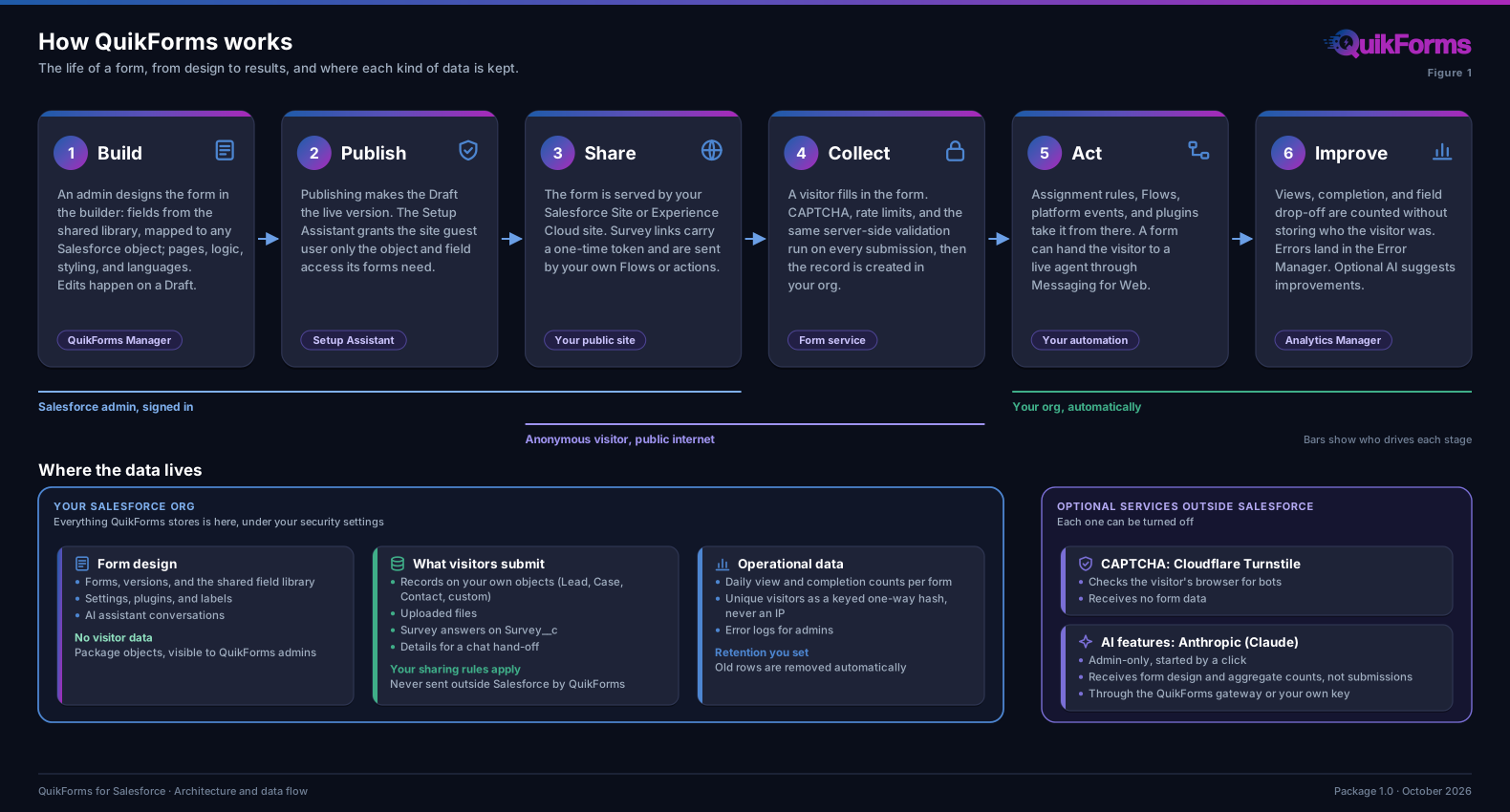
- Admins build and publish; anonymous visitors only ever see a published form; the customer’s own automation acts on the result.
- Edits happen on a Draft version. The live version changes only when an admin publishes.
2. System architecture
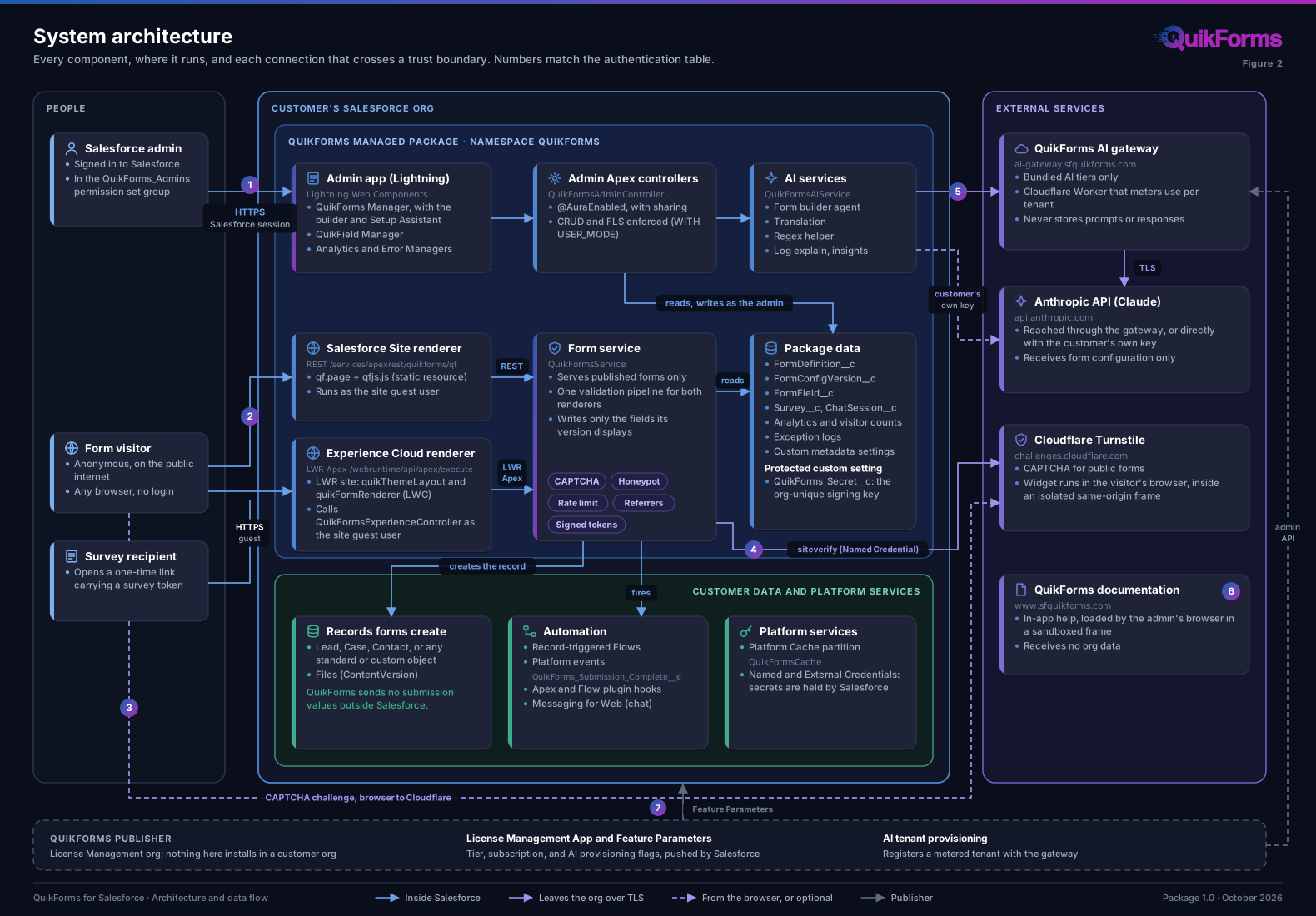
- The admin plane (top) runs as the signed-in admin, with sharing and with CRUD and FLS enforced.
- The public plane (middle) runs as the site guest user.
QuikFormsServiceis the one class both renderers reach. - Only connections 3 to 6 leave Salesforce, and each is optional or limited to admins.
3. Public form submission pipeline
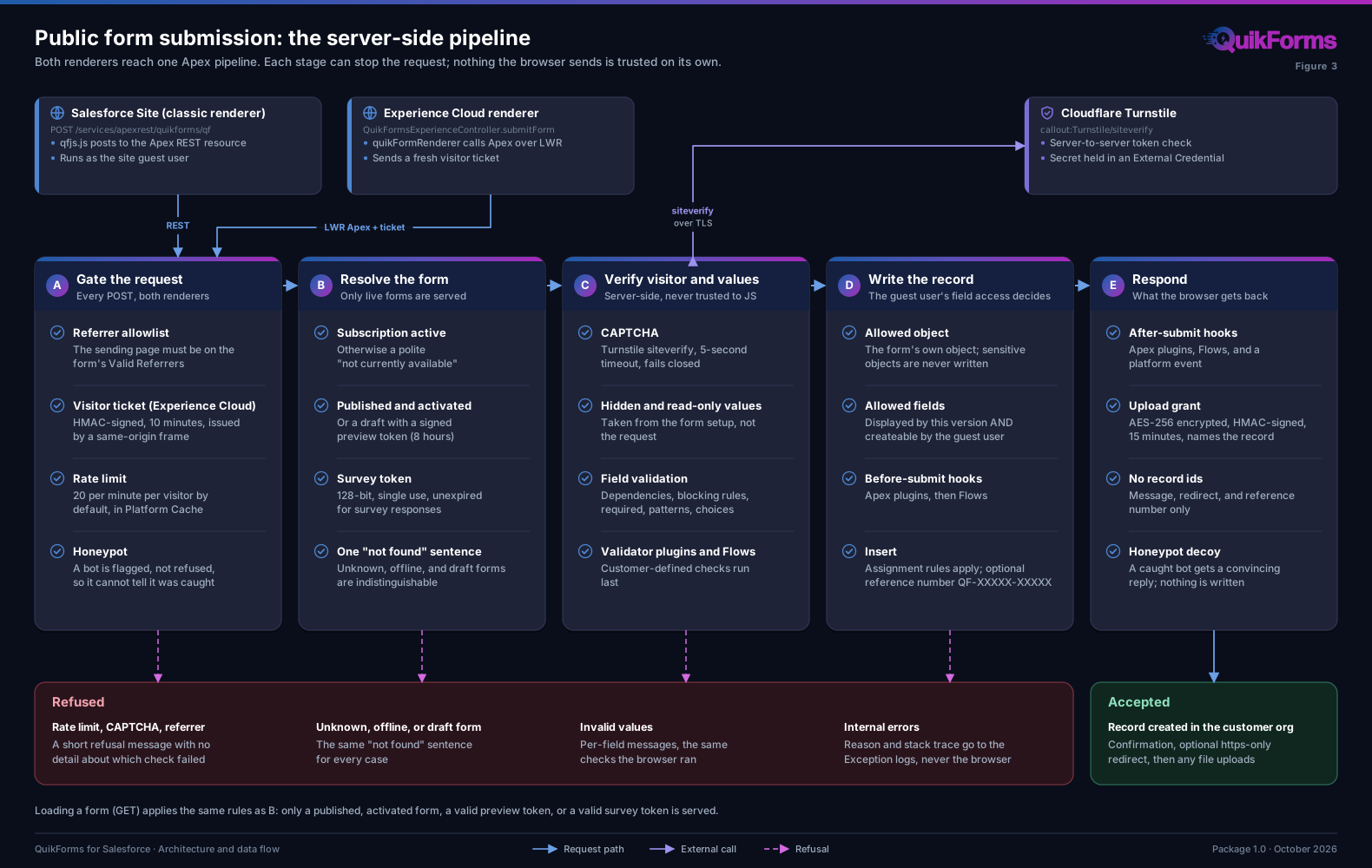
- Every refusal tells the visitor as little as possible. Unknown, offline, and draft forms all get the same “not found” sentence; internal reasons go to the Exception logs only.
- A record is written only for fields the submitted version displays (the published one, or a draft opened with a preview token) AND the guest user can create, so the admin’s guest permissions always decide.
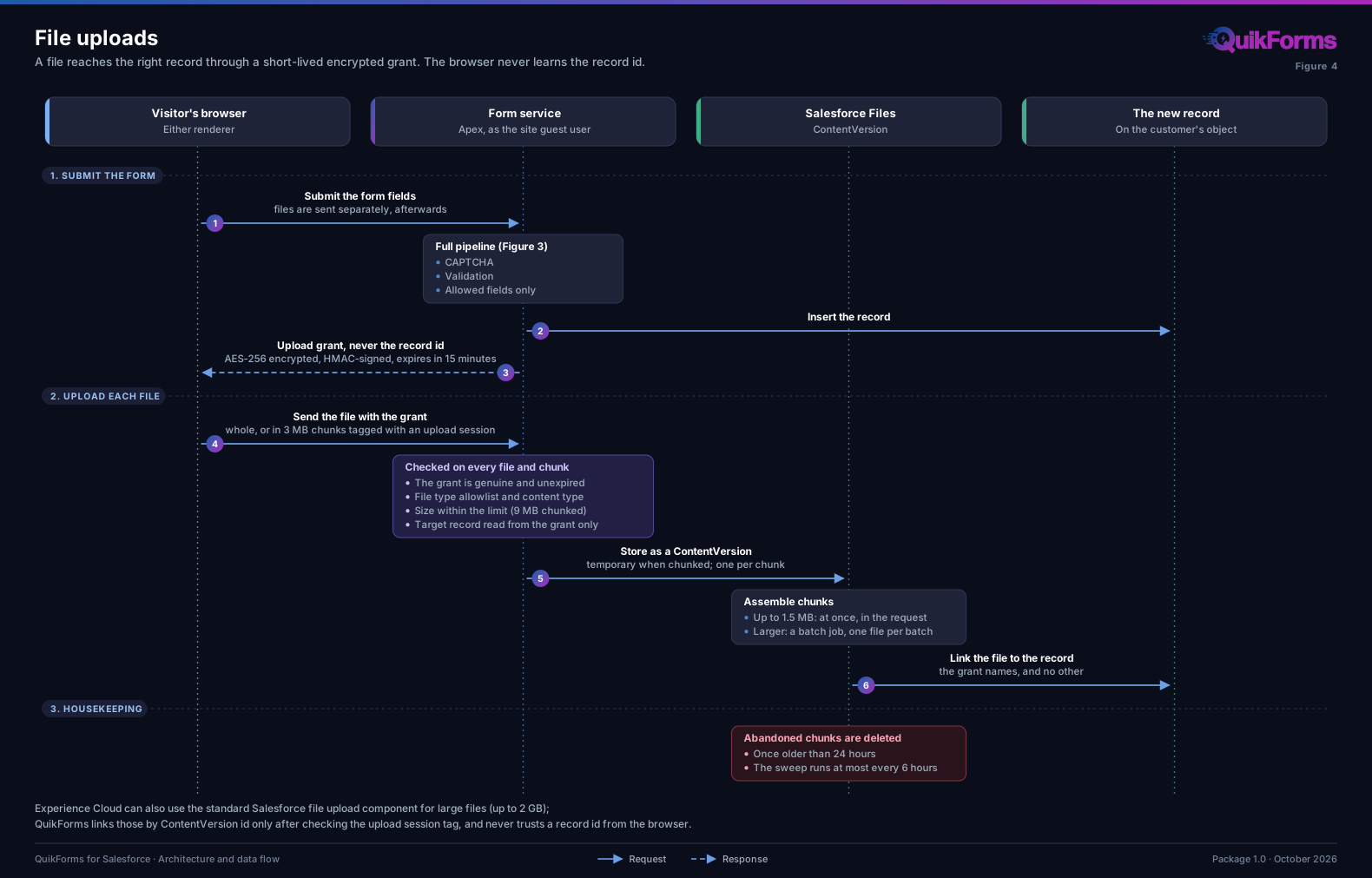
- The browser never receives a record id.
4. File uploads
5. AI features: data flow
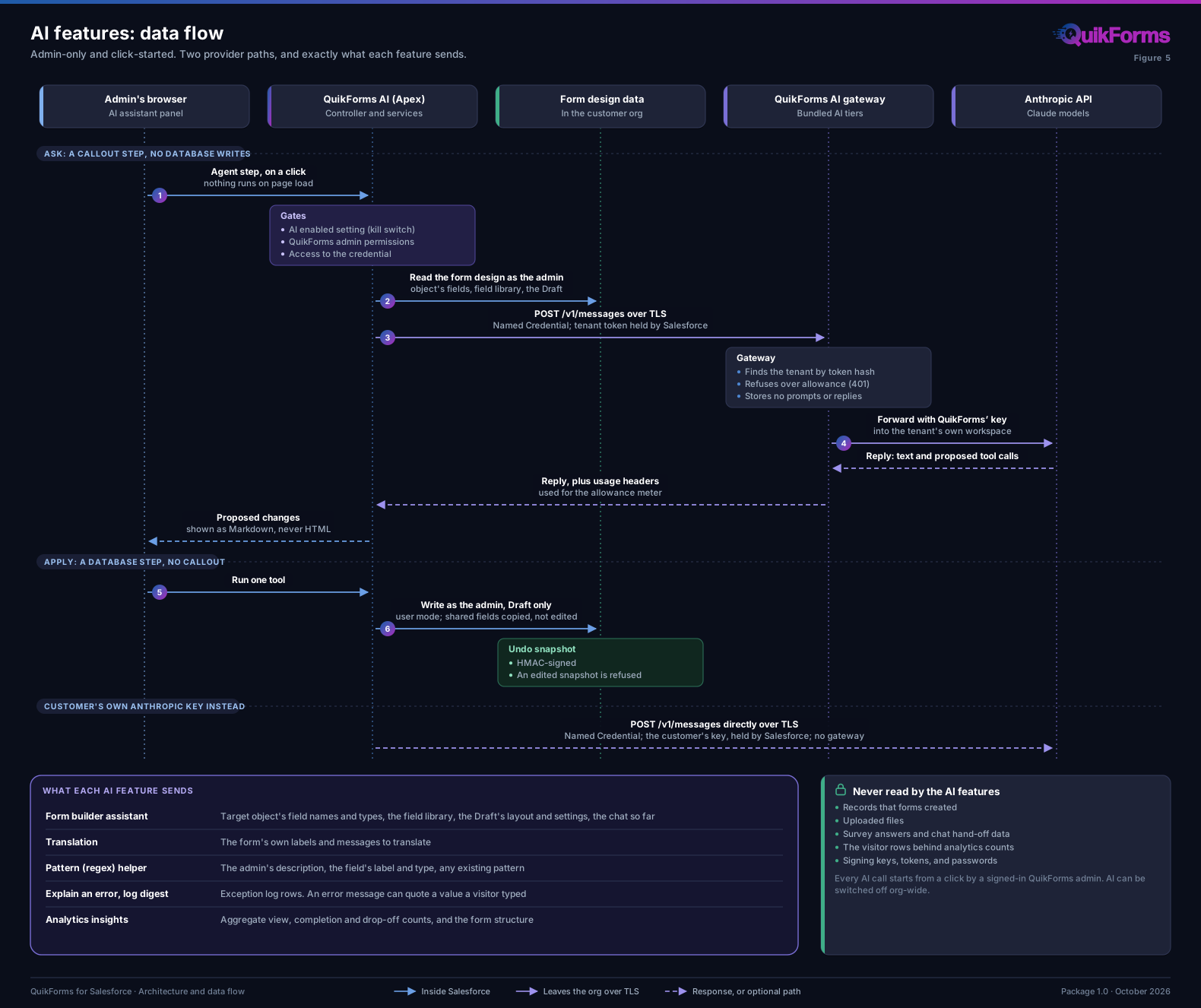
- The agent alternates a callout step with no database writes and a database step with no callout, so a model reply is never applied in the same transaction that fetched it.
- Changes are written as the admin (user mode), to the Draft only. A shared field is copied rather than edited, and Undo uses an HMAC-signed snapshot.
- The AI features do not read submitted records. An exception log row can quote a value a visitor typed, which is why log explanation is listed separately.
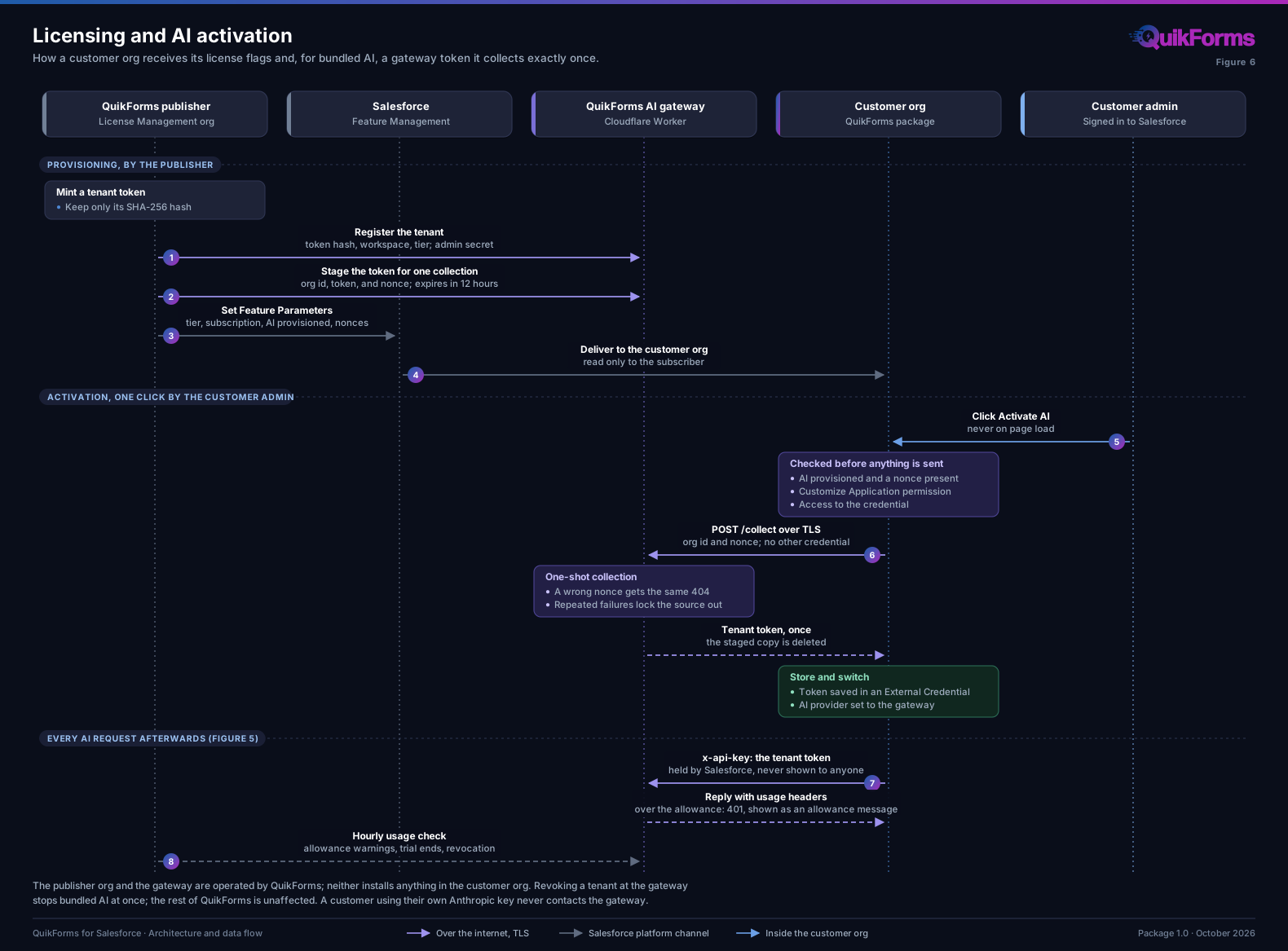
6. Licensing and AI activation
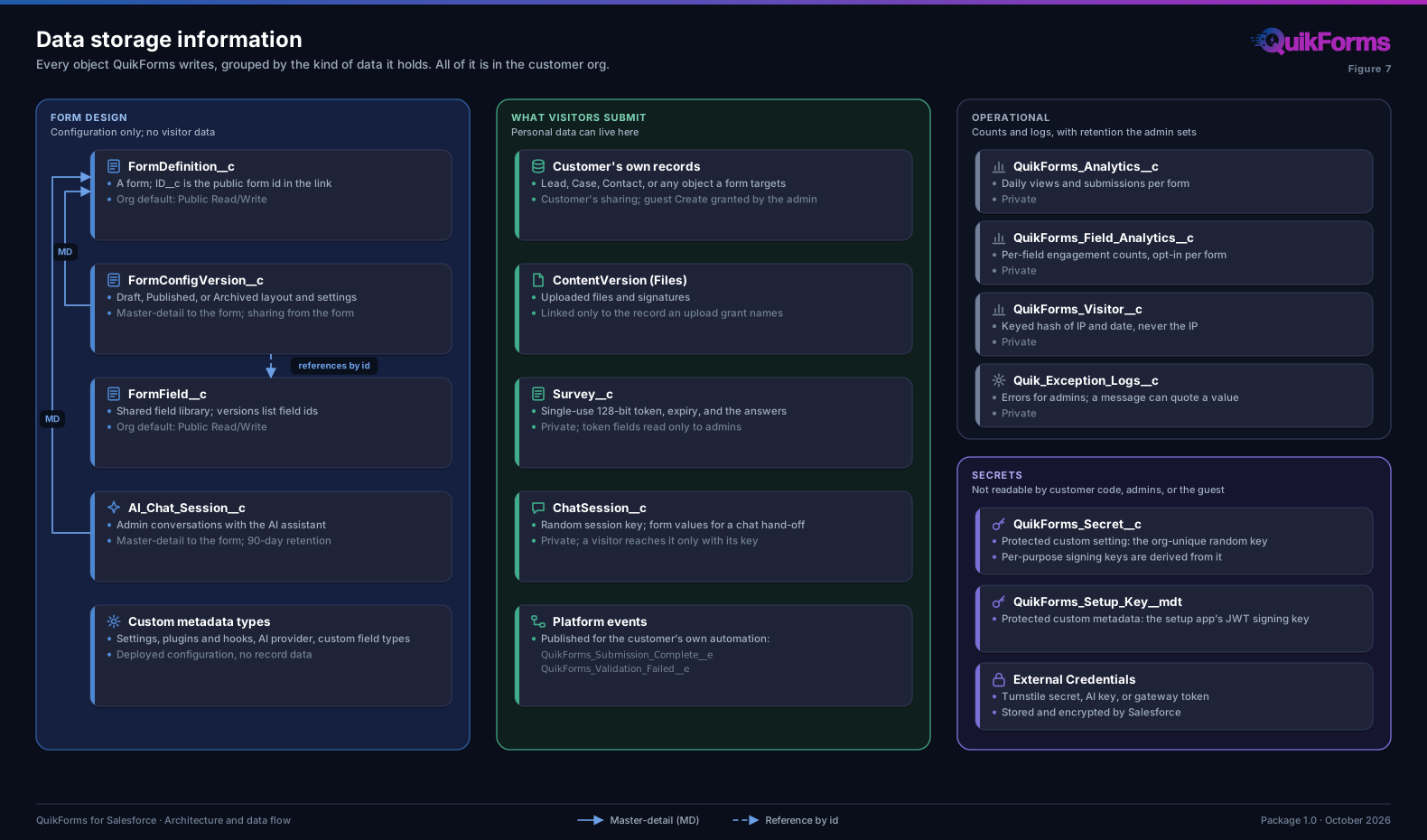
7. Data storage information
Authentication at each boundary
Numbers match the connections in Figure 2. Rows A and B are calls the org makes to its own Salesforce API.
| # | Connection | Authentication and authorization | Further controls |
|---|---|---|---|
| 1 | Admin to Salesforce | Salesforce login, under the customer’s own SSO and MFA policy. Access comes from the QuikForms_Admins permission set group. | Admin Apex controllers run with sharing and enforce CRUD and FLS (WITH USER_MODE). Admin-authored HTML is sanitized with DOMPurify before it is rendered. |
| 2 | Visitor to the public site | Anonymous site guest user. QuikForms_Guest grants Apex classes and pages only, with no object permissions. Object and field access comes from a separate permission set the admin syncs from published and draft forms, never including sensitive objects. | Valid Referrers allowlist, per-visitor rate limit, CAPTCHA, honeypot. Experience Cloud requests carry an HMAC-signed visitor ticket (10 minutes). Preview tokens are HMAC-signed (8 hours); survey tokens are 128-bit and single-use. |
| 3 | Visitor’s browser to Cloudflare Turnstile | None needed: the public Turnstile site key identifies the widget. | The widget loads only inside the isolated same-origin QuikFormsTurnstile frame, never in the form page. The frame talks to the form by postMessage restricted to the page’s own origin. |
| 4 | Org to Turnstile siteverify | Named Credential Turnstile; the secret key is in an External Credential. | TLS; 5-second timeout; a failed or unreachable check refuses the submission. |
| 5 | Org to the AI provider | Named Credential QuikForms_AI_Gateway with a per-tenant token, or QuikForms_Anthropic with the customer’s own key. Both secrets are in External Credentials, held by Salesforce. The one-time token collection uses QuikForms_AI_Gateway_Collect with a single-use nonce. | Admin-only and click-started; org-wide kill switch. The gateway hashes the token to find the tenant, enforces the allowance, rebuilds headers, and stores no prompts or replies. |
| 6 | Admin’s browser to the documentation site | None: public pages. | Loaded in a sandboxed iframe that cannot navigate or reach the Salesforce page. No org data is sent. |
| 7 | Publisher to the customer org | Salesforce Feature Management: Feature Parameters set by the License Management org and delivered by Salesforce. | Read only in the customer org. Nothing from the publisher org is installed in the customer org. |
| A | Setup automation to the org’s own API | The packaged QuikForms Setup External Client App: a JWT bearer exchange at the org’s own token endpoint, as the signed-in admin, with OAuth scopes Api and RefreshToken. The signing key is protected custom metadata. The access token is never stored. | The admin must pre-authorize the app and hold Customize Application. Every action runs only after a confirmation. Changes to org settings QuikForms does not own remain guided steps the admin performs. |
| B | Setup Assistant checks | Metadata API reads with the admin’s session, a supported use under Salesforce’s guidance on session IDs. | Read operations only (listMetadata, readMetadata, checkDeployStatus) to the org’s own domain. The session id is never logged, stored, returned to a browser, or sent off the org. |
External endpoints
This table lists every host outside the customer’s Salesforce org that QuikForms code or pages contact.
| Host | Called from | Purpose | Data sent |
|---|---|---|---|
challenges.cloudflare.com | Visitor’s browser (CSP Trusted Site) and Apex (Named Credential) | Turnstile CAPTCHA widget and token verification | The browser challenge; the Turnstile token and secret. No form data. |
ai-gateway.sfquikforms.com | Apex (Named Credentials) | Bundled AI tiers: metered proxy to Anthropic; one-time token collection | The AI request content listed in Figure 5; for collection, the org id and nonce only. |
api.anthropic.com | Apex (Named Credential), only with the customer’s own key | Claude models | The AI request content listed in Figure 5. |
www.sfquikforms.com | Admin’s browser (CSP Trusted Site), sandboxed iframe | Product documentation | No org data. The documentation pages count views with Cloudflare Web Analytics, which sets no cookies. |
Chat hand-off loads Salesforce’s own Messaging for Web script from the customer’s Salesforce site host; QuikForms allows only Salesforce site hosts or the page’s own origin. Plugins the customer writes run the customer’s own Apex, under the customer’s Remote Site and Named Credential settings.