Create secure, multi-language forms with built-in analytics, Cloudflare bot protection, and native Salesforce object mapping. No code required. No external services. Everything stays inside your org.
From visual builder to analytics dashboard, everything your team needs to create, deploy, and measure forms at scale
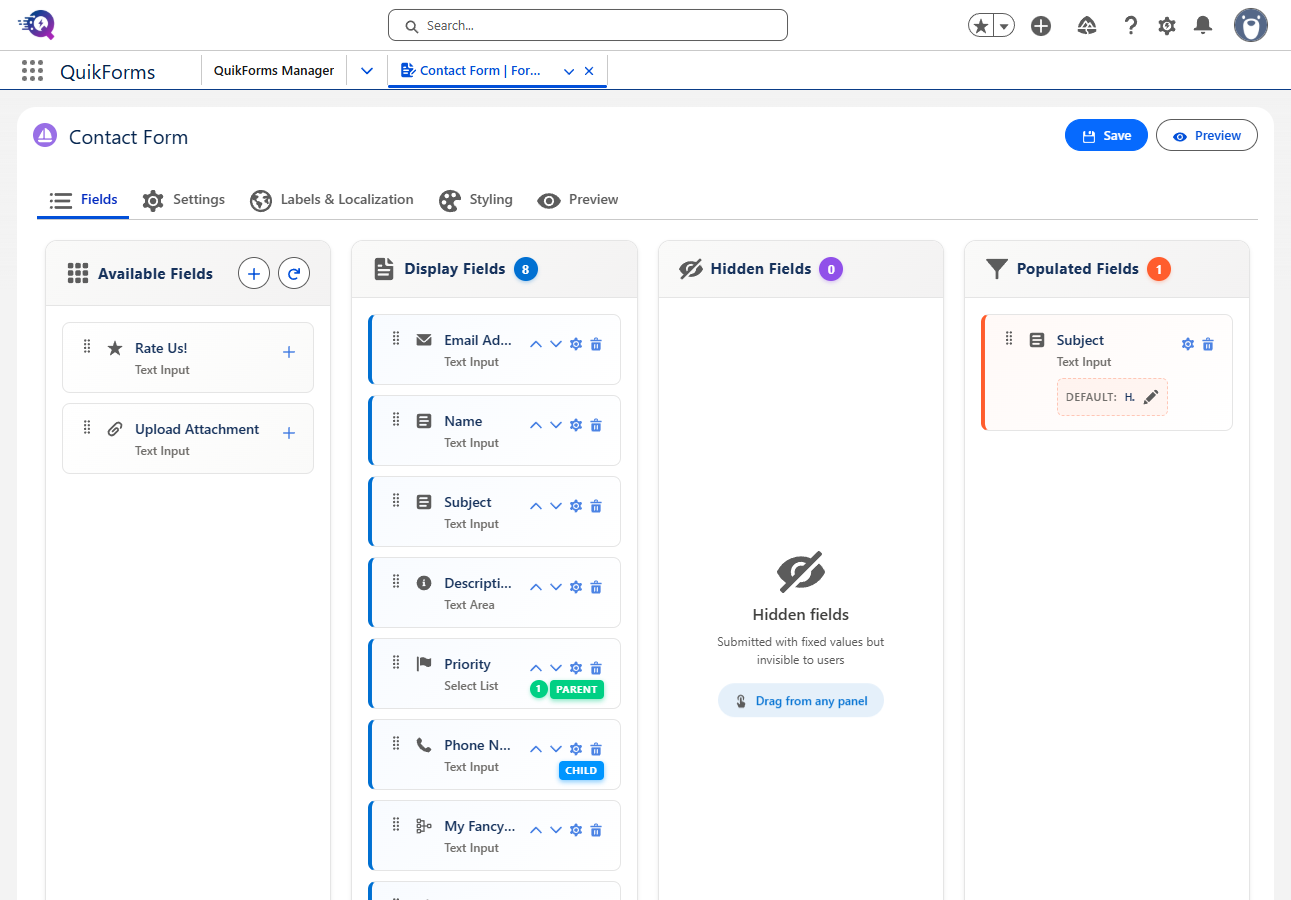
Visual Form Builder
Build forms visually with drag-and-drop field arrangement and real-time preview. Clone entire forms instantly, duplicate fields with one click, and manage versions with a full draft-to-publish lifecycle.
Drag-and-drop field ordering
Live form preview
Version control with draft/publish/rollback
One-click form and field cloning
Native Analytics Dashboard
Track form performance without third-party analytics. Views, submissions, conversion rates, device breakdowns, browser stats, referrer tracking, and daily trends—all stored natively in your Salesforce org.
Conversion rate and completion time
Device and browser breakdown
No cookies, no external services
GDPR/CCPA/HIPAA compliant by design
Multi-Language Localization
Reach global audiences with full localization support. Translate labels, descriptions, tooltips, error messages, and dropdown options per language. End-users switch languages instantly with a built-in picker.
Complete Brand Control
21 customizable color properties, gradient backgrounds, 30+ Google Fonts, and 8 pre-built themes. Upload your logo and favicon, adjust container widths, border radius, and every visual detail to match your brand.
Multi-Layer Security
Cloudflare Turnstile CAPTCHA, honeypot fields, origin verification, IP-based rate limiting, and input sanitization. All protected by Salesforce's native security model with TLS 1.2+ encryption.
File Uploads & Signatures
Accept file attachments up to 2GB via ContentDocument integration. Support for images, PDFs, documents, and more. Capture digital signatures with the built-in signature field type.
9 Field Types + Custom HTML
Text, textarea, select lists, radio buttons, checkboxes, date, datetime, signature, and custom HTML. Add field dependencies, decorators, tooltips, and regex validation. Extend with the plugin framework.
Deep Salesforce Integration
Map fields directly to any Salesforce object—standard or custom. Create multi-object forms with up to 3 levels of related records. Trigger Flows, fire Platform Events, and integrate with external systems via Named Credentials.
Forms, Surveys & Chat
Three form types for every use case. Record creation forms for data capture, survey forms with token-based access and expiration controls, and chat forms that integrate with Salesforce Live Chat.
Why Teams Choose QuikForms
Purpose-built for Salesforce organizations that need professional forms without the overhead
01
100% Native to Salesforce
No external servers, no third-party databases, no data leaving your org. Forms, submissions, analytics, and configurations all live inside Salesforce. Your data governance team will thank you.
02
Analytics Without the Tradeoffs
Built-in analytics track views, conversions, devices, and trends without Google Analytics, cookie banners, or third-party scripts. Stay compliant with GDPR, CCPA, and HIPAA by default.
03
Deploy in Minutes, Not Weeks
Go from concept to live form without touching code. The visual builder, pre-built themes, field templates, and setup assistant get your team productive immediately.
04
Enterprise Security Built In
Cloudflare Turnstile, honeypot fields, rate limiting, origin verification, and input sanitization work together. No security configuration bolted on after the fact—it's part of the architecture.
05
Extensible When You Need It
Start with no-code, grow into custom development. The plugin framework supports custom field types, validation logic, submission handlers, callout handlers, and a full JavaScript lifecycle API.
06
Multi-Object, Multi-Language
Create forms that write to multiple related objects in a single submission. Localize every element for global audiences. Build once, deploy everywhere—Sites, Experience Cloud, or embedded via iframe.
Built for Real-World Use Cases
See how organizations use QuikForms across departments and industries
Customer Contact & Case Creation
Deploy branded "Contact Us" forms that create Cases directly in Service Cloud. Capture file attachments, validate inputs with regex patterns, and block bots with Turnstile—all while logging analytics on form performance.
Case CreationFile UploadsBot Protection
Surveys & Customer Feedback
Send token-based survey links with configurable expiration periods. Track completion status, prevent duplicate submissions, and collect responses in custom Salesforce objects. Deploy in any language your customers speak.
Token AccessExpiration ControlMulti-Language
Multi-Object Data Collection
Create complex forms that write to multiple related Salesforce objects in a single submission. Map fields across up to 3 levels of parent-child relationships. Use field dependencies to show relevant questions dynamically.
Related ObjectsField DependenciesCustom Objects
Live Chat Pre-Qualification
Integrate forms with Salesforce Live Chat to pre-qualify visitors before connecting them with agents. Capture context fields, handle agent unavailability gracefully, and optionally create records during the chat flow.
Live ChatContext FieldsAgent Routing
How QuikForms Compares
See why teams are switching from legacy form builders to a 100% native solution
Your Data Never Leaves Salesforce
Most form builders route submissions through external servers before syncing to Salesforce. QuikForms writes directly to your org -- zero external databases, zero data transit, zero compliance risk.
OthersData stored on third-party servers, then synced
QuikForms100% native -- data goes straight into your Salesforce org
One Price, Unlimited Users
Per-user pricing adds up fast. A team of 10 on a typical form builder costs $600-$990/month. QuikForms is a flat per-org fee -- every admin, every user, no seat counting.
Others$59-99/user/month -- costs scale with team size
QuikFormsFlat per-org pricing -- unlimited users included
Forms + Surveys + Chat in One Package
Competitors sell forms, surveys, and document tools as separate products with separate bills. QuikForms bundles record creation forms, token-based surveys, and live chat integration into a single install.
OthersSeparate products for forms, surveys, and documents
QuikFormsForms, surveys, and chat -- all included in every plan
Analytics Without Cookie Banners
Other tools rely on Google Analytics or third-party tracking scripts that require cookie consent banners. QuikForms analytics are built in, run natively in Salesforce, and use zero cookies or external scripts.
QuikFormsNative analytics -- no cookies, no consent banners needed
Extensible Plugin Framework
No other Salesforce form builder offers a true plugin system. QuikForms Professional lets developers build custom field types, validators, submission handlers, and callout handlers with Apex and JavaScript.
OthersClosed systems -- you get what ships, nothing more
QuikFormsOpen plugin framework with Apex + JavaScript APIs
Multi-Language Built In
Localization is usually an enterprise add-on or not available at all. QuikForms Standard includes label customization, and Professional unlocks full multi-language localization across 34+ languages -- translate every label, tooltip, error message, and dropdown option.
OthersLocalization as a paid add-on or enterprise-only
QuikFormsLabel customization on Standard, 34+ locales on Professional
All plans include unlimited form submissions and come with a 14-day free trial. No credit card required.
Trusted by Salesforce Teams
Hear from admins and developers who use QuikForms every day
"We dropped Google Analytics entirely for our forms. The built-in analytics give us everything we need—conversion rates, device breakdowns, referrer data—without cookie consent headaches or third-party scripts."
Sarah Martinez
Salesforce Administrator
Global Tech Solutions
"The plugin framework is incredibly well thought out. We built custom field validators and submission handlers that integrate with our ERP system. Started no-code, extended with Apex when we needed to—exactly the right approach."
Michael Chen
Senior Salesforce Developer
Enterprise Corp
"We support customers across 6 countries. QuikForms lets us maintain one form with full translations—labels, error messages, even dropdown options localized per language. The theme system matched our brand in under an hour."
Emily Rodriguez
Salesforce Admin & UX Lead
Creative Agency Inc
Frequently Asked Questions
Everything you need to know about QuikForms
Not at all. QuikForms is designed for Salesforce administrators with no development background.
The visual builder, drag-and-drop fields, pre-built themes, and setup assistant make it possible to
create professional forms without writing any code. For teams that need advanced customization,
the Professional plan includes a plugin framework with Apex interfaces and a JavaScript API—but
it's entirely optional.
QuikForms tracks form performance natively inside Salesforce—no external analytics services, no
cookies, no third-party scripts. You get total views, unique visitors, submissions, conversion rates,
average completion time, device and browser breakdowns, top referrers, and daily trends. Analytics
can be toggled on or off per form. Because all data stays in your Salesforce org, you avoid GDPR,
CCPA, and HIPAA compliance complications that come with external tracking tools.
Forms can create any standard Salesforce object (Cases, Leads, Contacts, etc.) or any custom object
in your org. The Standard plan supports single-object submissions, while the Professional plan unlocks
multi-object forms that can create up to 3 levels of related parent/child records in a single submission.
Professional also adds Flow integration for complex business logic and Platform Events for asynchronous
processing and external system integration via Named Credentials.
QuikForms uses a defense-in-depth approach. Cloudflare Turnstile provides privacy-friendly CAPTCHA
verification without intrusive challenges. Honeypot fields catch automated bots silently. Origin verification
blocks cross-site submission attempts. IP-based rate limiting (via Platform Cache) prevents abuse.
All inputs are validated and sanitized on both client and server sides. Data is encrypted in transit
via TLS 1.2+ and supports Salesforce Shield encryption at rest. The plugin framework itself blocks
dangerous Apex patterns to prevent privilege escalation.
Completely. QuikForms provides 21 customizable color properties covering backgrounds, text, buttons,
inputs, borders, titles, and more—with gradient support for backgrounds and titles. Choose from 30+
Google Fonts, upload your logo and favicon, and adjust container widths and border radius. Start with
one of 8 pre-built themes (Azure Horizon, Corporate Steel, Forest Executive, Navy Professional, and
others) and customize from there. Every visual detail is controllable without CSS.
The Standard plan includes label customization so you can tailor every field label, description,
and tooltip in a single language. The Professional plan unlocks full multi-language localization
across 34+ languages using JSON-based translations that cover every text element: form titles, subtitles,
field labels, descriptions, tooltips, placeholder text, dropdown/radio options, error messages,
confirmation messages, and submit button labels. End-users switch languages via a built-in picker,
and the system falls back to English for any missing translations.
QuikForms works on Salesforce Sites, Experience Cloud communities, or embedded via iframe on any
external website. Forms are rendered through a Visualforce page with Lightning Web Components, so
they work everywhere Salesforce is accessible. Preview forms with time-limited tokens before publishing,
and use development mode for testing inactive forms in your sandbox.
The 14-day free trial includes full access to all Professional plan features: unlimited forms,
all field types, multi-object forms, multi-language localization (34+ languages), complete styling
control, file uploads, bot protection, full analytics dashboard, version history & rollback,
the plugin framework, Flow integration, Platform Events, and priority support. No credit card is
required to start your trial, and you can upgrade, downgrade, or cancel at any time.
Start Building Better Salesforce Forms Today
Secure forms, native analytics, multi-language support, and zero external dependencies. See why Salesforce teams are switching to QuikForms.